Desks
Create, stop, and delete desks: one piece of work, with its workspaces, capsules, and environment.
Last updated
On this page
Overview
A desk groups your workspaces and capsules and connects them to an environment. It joins a set of workspaces to one environment, so that each workspace reaches the services of the environment by name, for example postgres://db:5432. Code in a workspace runs against the real dependencies of the application, with no local set-up.
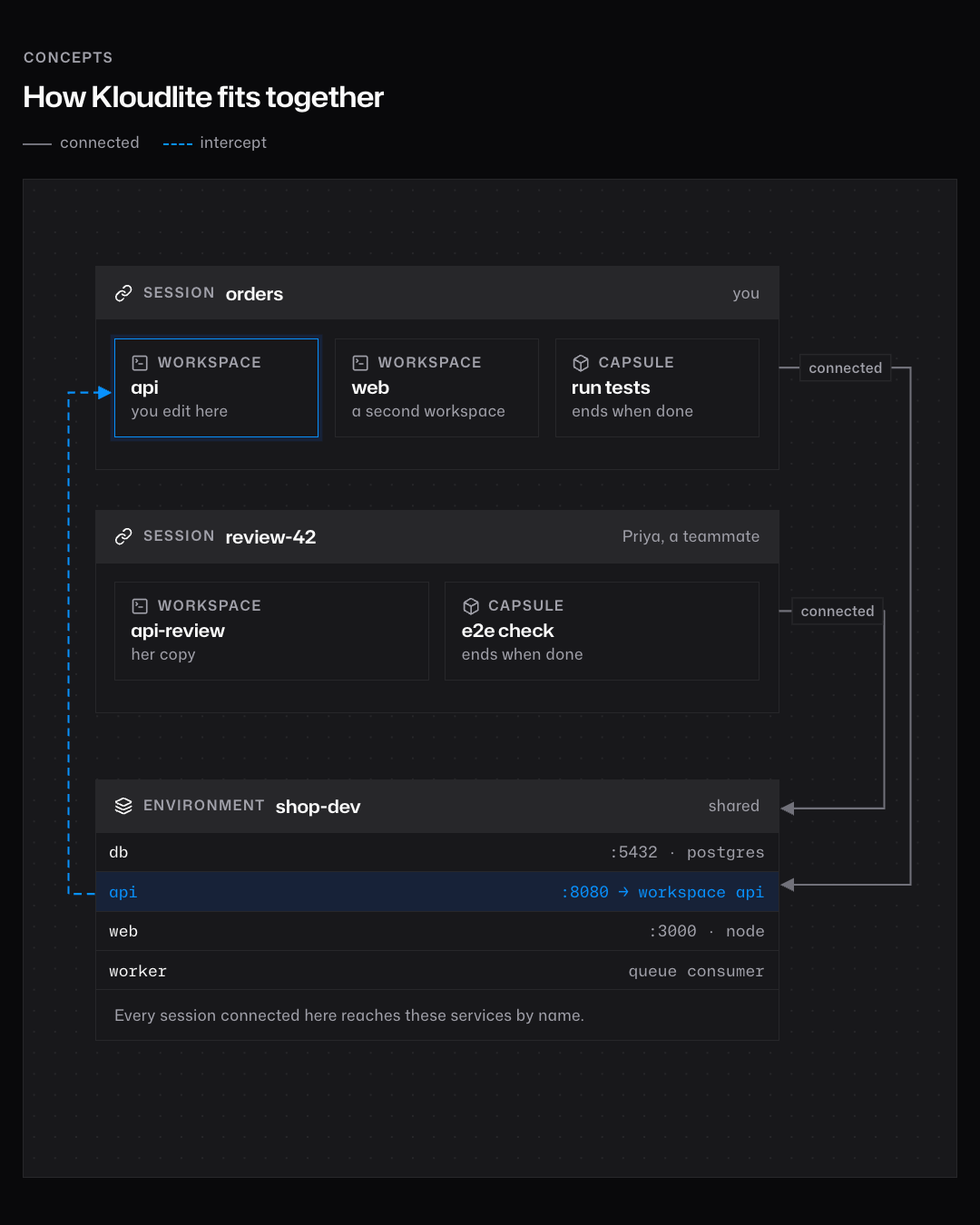
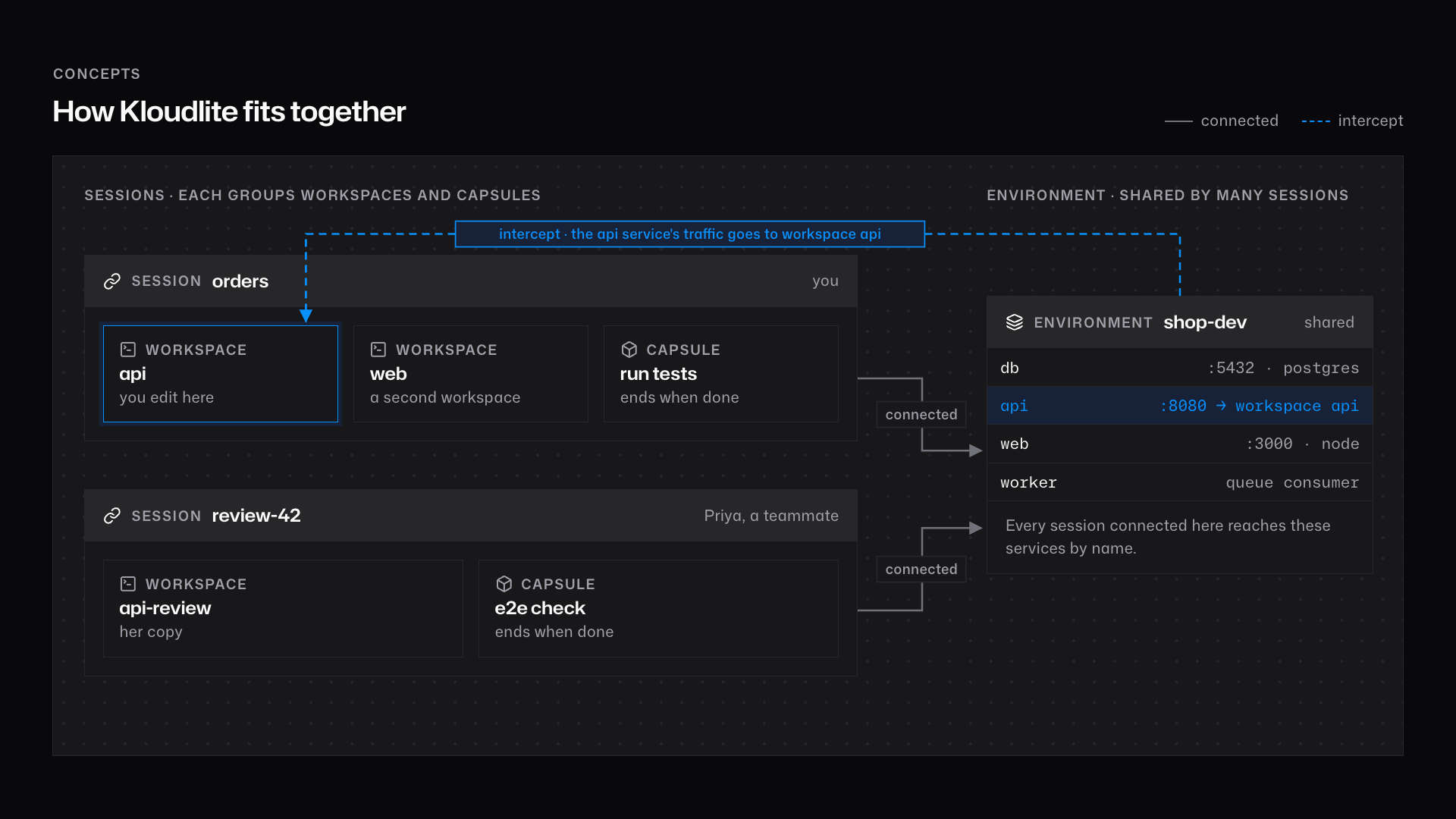
A desk belongs to the person who creates it, in their personal team or in a team. Other members of the team cannot see or change it. They work in their own desks, which can connect to the same environment.
| Part | Description | See |
|---|---|---|
| Workspaces | The workspaces created in the desk. The desk starts, stops, and deletes them. | Workspaces |
| Capsules | Short-lived capsules that run a command against the services of the environment. | Capsules |
| Environment | The environment that the workspaces reach. One per desk, or none. | Desk environment |
| Intercepts | Services of the environment whose traffic goes to a workspace of the desk. | Intercepts |
Desks let several developers work on one environment at the same time, each in their own desk. See Use cases.
A desk has a name: name for a personal desk, team/name for a team desk. Its id starts with desk-.
The runtime
A desk has no machine of its own. The Kode runtime serves every desk. It is a service of the region, and it keeps the conversation of each desk in storage. A desk is always ready to take a message.
The kode program and the harness reach the runtime through the tunnel of the desk. An MCP client reaches it through kode mcp. A message that arrives while the runtime is busy waits in the queue of the desk.
Read the queue with GET /v1/desks/{id}/queue. pending is the number of messages not yet handled. failed is the number that the runtime gave up on after five attempts over about 85 seconds. POST /v1/desks/{id}/queue/replay puts them back in the queue. A desk with failed above 0 shows the reason N messages failed; see the queue.
States
state | Meaning |
|---|---|
running | The desk is in use, or ready for use. |
idle | The desk was not used for 30 minutes. Its workspaces are stopped. |
stopped | You stopped the desk. Its workspaces are stopped. |
Lifecycle
- Use. A desk is in use while a client is connected, a message is being handled, or an environment tunnel carries data. It is also in use while any of its workspaces is in use: an SSH connection, a tool request, or a running capsule. A detached process does not count.
- Idle stop. After 30 minutes without use, the desk is
idleand its workspaces stop, withidle_sinceset. Its environment stops 5 minutes later, unless another awake desk is connected to it. - Wake. Starting a workspace of the desk, creating a workspace in it, connecting an environment, or sending a hold wakes the desk and its environment. A wake never starts a resource that you stopped yourself.
- Stop. Stopping a desk stops all its workspaces. Their homes are kept. Start the desk again with
kode desks start. - Time to live. The platform deletes a desk that is not used for
ttl_secs(600 to 2592000). An awake desk never expires. - Delete. Deleting a desk releases its intercepts and deletes its workspaces. Their snapshots and the environment remain.
Quota and limits
A desk uses no vCPU, memory, or disk from the owner's quota. Its workspaces and its environment count separately.
| Item | Limit |
|---|---|
| Name | 1 to 40 lowercase letters, digits, or -. Start with a letter, end with a letter or digit, no --. Unique for you in the team. |
| Environment | One per desk, of the desk's own team. |
The live page
The live page shows what a desk holds, read only. Open it from the desk in the console, at /{owner}/desks/{id}/live. A sidebar on the left lists the desk, its workspaces, its capsules, and its environment with each service. Select one item and the page shows it with its own header.
A workspace shows the workspace live page: its tasks, its tool calls, its files, and its running processes. A capsule shows its logs and its exit state. The environment shows its volume snapshot and a table of services. A service shows its state, its ports, which workspace intercepts it, and whether it needs a restart. Each link keeps the selection, so you can share the address of one item.
Only the owner of the desk sees the page, and it has no control that changes anything. Opening the page never wakes a desk and never keeps it awake. A stopped desk shows kode desks start --desk NAME. A stopped workspace, a capsule that ended, and an environment that is down still show, from stored records.
If a workspace does not answer, its row shows a sentence that explains why. The rest of the page still loads. A desk with no workspaces or no environment shows an empty state that names the next step. An unknown desk id shows a 404 page.
Tasks
Create a desk
Reason for the task
Start a working context for your workspaces.
Job set-up
- Access: you.
- References:
POST /v1/desks.
Procedure
Create the desk. Use
team/namefor a team desk, and setenvironmentto connect one at once.from kloudlite import Kodekl = Kloudlite()x = kl.desks.create(desk="dev", environment="shop")print(x["id"])import { Kode } from "./index.ts";const kl = new Kloudlite();const x: any = await kl.desks.create({ desk: "dev", environment: "shop" });console.log(x.id);kl := kloudlite.New(kloudlite.Options{})x, err := kl.Desks.Create(kloudlite.CreateDesk{Desk: "dev", Environment: "shop"})if err != nil { log.Fatal(err)}fmt.Println(x["id"])require_relative "kloudlite"kl = Kloudlite::Client.newputs kl.desks.create(desk: "dev", environment: "shop")["id"]var kl = new Kloudlite();System.out.println(kl.desks().create(new Kloudlite.CreateDesk().desk("dev").environment("shop")));kode desks create dev --environment shop
Close-out
- Make sure that the desk is in
kode desks list.
Keep a desk awake
Reason for the task
Prevent an idle stop while you work outside kode and the desk.
Job set-up
- Access: you.
- References:
POST /v1/desks/{id}/hold.
Procedure
Send a hold for the desk, and repeat it at least every 60 seconds. The response is
204.sid = kl.desks.get(desk="dev")["id"]kl.request("POST", f"/v1/desks/{sid}/hold")const sid: string = ((await kl.desks.get({ desk: "dev" })) as any).id;await kl.request("POST", `/v1/desks/${sid}/hold`);s, err := kl.Desks.Get("dev")if err != nil { log.Fatal(err)}if err := kl.Request("POST", "/v1/desks/"+s["id"].(string)+"/hold", kloudlite.RequestOptions{}); err != nil { log.Fatal(err)}sid = kl.desks.get(desk: "dev")["id"]kl.request("POST", "/v1/desks/#{sid}/hold")// The client returns raw JSON; read "id" with your JSON library.var s = kl.desks().get("dev");int k = s.indexOf("\"id\":\"") + 6;kl.request("POST", "/v1/desks/" + s.substring(k, s.indexOf('"', k)) + "/hold");kode request POST /v1/desks/$(kode desks get dev --json | jq -r .id)/hold
Close-out
- Make sure that the desk's workspaces are not
stopped.
Set the time to live
Reason for the task
Delete a desk automatically after a period without use.
Job set-up
- Access: you.
- References:
PUT /v1/desks/{id}/ttl.
Procedure
Set
ttl_secsfrom 600 to 2592000. Set it to no value (None,null,nil) to clear it.kl.desks.set_ttl(desk="dev", ttl_secs=86400)await kl.desks.setTtl({ desk: "dev", ttlSecs: 86400 });ttl := int64(86400)if _, err := kl.Desks.SetTTL("dev", &ttl); err != nil { log.Fatal(err)}kl.desks.set_ttl(desk: "dev", ttl_secs: 86400)kl.desks().setTtl("dev", 86400L);kode desks set-ttl dev --ttl-secs 86400
Close-out
- Make sure that
expires_atshows a time, or no value if you cleared it.
Stop a desk
Reason for the task
Release the compute of a desk and keep its data.
Job set-up
- Access: you.
- References:
POST /v1/desks/{id}/stop.
All workspaces in the desk stop, and their processes end. Their homes are kept. The environment keeps running for other desks.
Procedure
Stop the desk. Use
team/namefor a team desk.kl.desks.stop(desk="dev")await kl.desks.stop({ desk: "dev" });if _, err := kl.Desks.Stop("dev"); err != nil { log.Fatal(err)}kl.desks.stop(desk: "dev")kl.desks().stop("dev");kode desks stop --desk dev
Close-out
- Make sure that the desk and its workspaces show
stopped.
Delete a desk
Reason for the task
Remove a desk that you no longer need.
Job set-up
- Access: you.
- References:
DELETE /v1/desks/{id}.
The desk's intercepts are released, and its workspaces are deleted. Snapshots and the environment remain.
Procedure
Delete the desk.
kl.desks.delete(desk="dev")await kl.desks.delete({ desk: "dev" });if err := kl.Desks.Delete("dev"); err != nil { log.Fatal(err)}kl.desks.delete(desk: "dev")kl.desks().delete("dev");kode desks delete dev
Close-out
- Make sure that the desk is no longer in
kode desks list.
List desks
Reason for the task
Find the desks that you can use.
Job set-up
- Access: you.
- References:
GET /v1/desks,kode desks list.
Procedure
Show the list. Pass a team to list the desks of that team.
print(kl.desks.list())console.log(await kl.desks.list());list, err := kl.Desks.List("")if err != nil { log.Fatal(err)}fmt.Println(list)p kl.desks.listSystem.out.println(kl.desks().list(null));kode desks list
Close-out
- Make sure that each desk that you expect is listed.
Start a desk
Reason for the task
Run the environment and workspaces of a stopped or idle desk again.
Job set-up
- Access: you.
- References:
POST /v1/desks/{id}/start,kode desks start.
The call starts the environment first, then the workspaces. The desk itself needs no start, because the runtime is always up.
Procedure
Start the desk. Use
team/namefor a team desk.kl.desks.start(desk="dev")await kl.desks.start({ desk: "dev" });if _, err := kl.Desks.Start("dev"); err != nil { log.Fatal(err)}kl.desks.start(desk: "dev")kl.desks().start("dev");kode desks start --desk dev
Close-out
- Make sure that the workspaces of the desk show
running.
Troubleshooting
| Symptom | Possible cause | Corrective action |
|---|---|---|
404 with not found | The desk or workspace does not exist, or is not yours. | Check the name. Use team/name for a team. |
409 with you already have a desk named dev in acme | You already have a desk with this name in the team. | Use another name, or end the old desk. |
409 with the desk is stopped; start it with start | You stopped the desk. | Run kode desks start, then kode --start. |
Desk dev is stopped. Run kode --start -s dev, or open another once with kode -s <desk>. | You stopped the desk. kode checks it before it opens kd-tui. | Run kode --start -s dev, or open another desk with kode -s NAME. |
A workspace of the desk is stopped with idle_since set | The desk went idle. | Run kode desks start --desk dev, or send a hold. |
the desk did not open within 90 s | The wake of an idle desk needs more time. | Run the command again. If it persists, check the queue of the desk. |
403 with your access to acme is paused | A team administrator paused your access. | Ask a team administrator to restore it. |
no desk picked: open one once with kode -s <desk> | The tunnel has no desk of this team. | Run kode -s NAME. |
no desk dev; yours: and a list | --desk names none of your desks in this team. | Use a name or id from the list. |
kd-tui must be installed beside kode | kd-tui is missing from the folder of kode. | Reinstall kode. |